subscriptionUpgradeRequest
- 🇬🇧 English
- 🇮🇹 Italian
Function Names: subscriptionUpgradeRequest / testSubscriptionUpgradeRequest
Trigger: HTTPS (onRequest)
Purpose: Handles subscription upgrade requests by sending personalized emails from customers to administrators. Retrieves user profile information from Profiles collection and sends templated emails using ZeptoMail to facilitate subscription upgrade communications between users.
Detailed Functionality
1. REQUEST VALIDATION
- Validates presence of all required parameters: to, from, subject, description, subscriptionDetails, subscriptionName
- Returns 400 error if any required parameter is missing
- Validates request body contains data
2. PROFILE DATA RETRIEVAL
- Queries 'Profiles' collection for both sender ('from') and recipient ('to') email addresses
- Retrieves firstName and lastName for both users
- Handles cases where profiles don't exist (fallback to email addresses)
- Uses parallel Promise.all for efficient data retrieval
3. EMAIL TEMPLATE PREPARATION
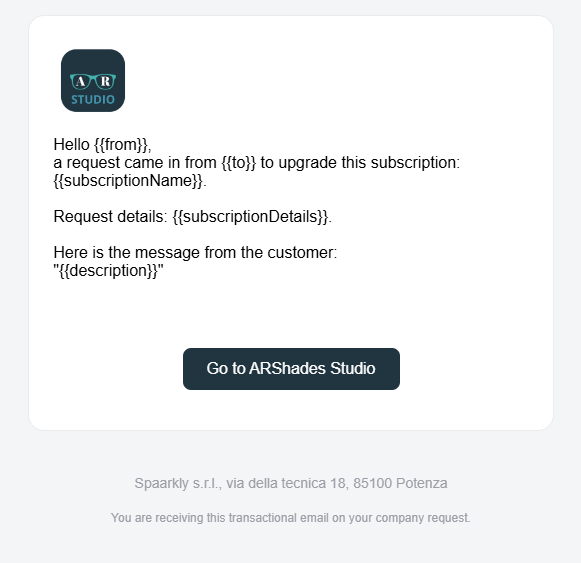
- Uses dedicated ZeptoMail template (
MAIL_TEMPLATE_KEY:13ef.8598f19fbcc5adb.k1.bbfeff10-5d90-11f0-9e15-dad70ff08860.197f47f3181) - Prepares template variables:
{{subject}}: Email subject line{{from}}: Full name of sender (fallback to email if name unavailable){{to}}: Full name of recipient (fallback to email if name unavailable){{subscriptionName}}: Name of the subscription{{subscriptionDetails}}: Detailed subscription information{{description}}: Customer message/description
4. NAME RESOLUTION LOGIC
- Combines firstName and lastName for both sender and recipient
- Trims whitespace and handles empty name fields
- Falls back to email address if no name information is available
- Ensures proper display names for email recipients
5. EMAIL SENDING WITH ZEPTOMAIL
- Sends email using ZeptoMail template system
- Sets sender as "ARShades Studio
<no-reply@arshades.com>" - Uses recipient's full name and email for proper addressing
- Includes all template variables for dynamic content rendering
6. RESPONSE FORMATTING
- Returns detailed success response with user information
- Includes both sender and recipient profile data
- Provides ZeptoMail merge information for debugging
- Logs all operations for monitoring and troubleshooting
7. ERROR HANDLING
- Comprehensive error handling for database queries
- ZeptoMail API error management
- Detailed error logging with context information
- Returns structured error responses with HTTP status codes
8. CORS SUPPORT
- Implements CORS middleware for cross-origin requests
- Allows frontend applications to call the function
- Supports both development and production environments
9. TEST FUNCTION IMPLEMENTATION
- Separate test function for development and debugging
- Identical logic to main function with enhanced logging
- Enables local testing with Firebase emulators
- Provides detailed test result information
10. LOGGING AND MONITORING
- Comprehensive logging at each processing stage
- Logs sender/recipient information and subscription details
- Tracks email sending success and failure scenarios
- Provides debugging information for troubleshooting
Input (Payload)
Method: POST
Headers:
Content-Type: application/json
Body:
{
  "to": "carmine.bonavoglia@spaarkly.com",
  "from": "92mt@live.it",
  "subject": "Richiesta Upgrade Sottoscrizione ARShades Pro",
  "description": "Vorrei richiedere un upgrade della mia sottoscrizione per accedere a funzionalità avanzate",
  "subscriptionDetails": "Upgrade da Basic a Pro - Include analytics avanzate e supporto prioritario",
  "subscriptionName": "ARShades Pro"
}
Parameters:
to(string, required): Recipient email addressfrom(string, required): Sender email addresssubject(string, required): Email subject linedescription(string, required): Customer message/descriptionsubscriptionDetails(string, required): Detailed subscription informationsubscriptionName(string, required): Name of the subscription
Output (Success)
{
  "success": true,
  "message": "Richiesta di upgrade sottoscrizione inviata con successo",
  "details": {
    "to": {
      "email": "carmine.bonavoglia@spaarkly.com",
      "firstName": "Carmine",
      "lastName": "Bonavoglia"
    },
    "from": {
      "email": "92mt@live.it",
      "firstName": "Michele",
      "lastName": "Telesca"
    },
    "subscriptionName": "ARShades Pro"
  },
  "zeptomail_merge_info": {
    "subject": "Richiesta Upgrade Sottoscrizione ARShades Pro",
    "from": "Michele Telesca",
    "to": "Carmine Bonavoglia",
    "subscriptionName": "ARShades Pro",
    "subscriptionDetails": "Upgrade da Basic a Pro - Include analytics avanzate e supporto prioritario",
    "description": "Vorrei richiedere un upgrade della mia sottoscrizione per accedere a funzionalità avanzate"
  }
}
Response Properties:
success(boolean): Indicates if the operation was completed successfullymessage(string): Descriptive message about the operation resultdetails(object): Contains sender and recipient information with resolved namesto(object): Recipient information including email and resolved namefrom(object): Sender information including email and resolved namesubscriptionName(string): Name of the subscription being requestedzeptomail_merge_info(object): Template variables sent to ZeptoMail for debugging
Testing
URL (if HTTPS): http://127.0.0.1:5001/arshadesstaging/europe-central2/testSubscriptionUpgradeRequest
Test con Emulator:
- Avviare l'emulatore Firebase:
firebase emulators:start --only functions - Assicurarsi di usare Node.js versione 20:
nvm use 20 - Testare con curl:
curl -X POST "http://127.0.0.1:5001/arshadesstaging/europe-central2/testSubscriptionUpgradeRequest" \
-H "Content-Type: application/json" \
-d '{
  "to": "carmine.bonavoglia@spaarkly.com",
  "from": "92mt@live.it",
  "subject": "Richiesta Upgrade Sottoscrizione ARShades Pro",
  "description": "Vorrei richiedere un upgrade della mia sottoscrizione",
  "subscriptionDetails": "Upgrade da Basic a Pro",
  "subscriptionName": "ARShades Pro"
}'
Postman Testing:
- Metodo: POST
- URL:
http://127.0.0.1:5001/arshadesstaging/europe-central2/testSubscriptionUpgradeRequest - Headers:
- Key:
Content-Type - Value:
application/json
- Key:
- Body: raw JSON (vedi esempi sopra)
Deploy Command
firebase deploy --only functions:subscriptionUpgradeRequest,functions:testSubscriptionUpgradeRequest
Production URL
subscriptionUpgradeRequest: https://europe-central2-arshades-7e18a.cloudfunctions.net/subscriptionUpgradeRequest
testSubscriptionUpgradeRequest: Not deployed to production (test function only)
Function Names: subscriptionUpgradeRequest / testSubscriptionUpgradeRequest
Trigger: HTTPS (onRequest)
Purpose: Gestisce richieste di upgrade sottoscrizione inviando email personalizzate dai clienti agli amministratori. Recupera informazioni del profilo utente dalla collezione Profiles e invia email template usando ZeptoMail per facilitare le comunicazioni di upgrade sottoscrizione tra utenti.
Funzionamento Dettagliato
1. VALIDAZIONE RICHIESTA
- Valida la presenza di tutti i parametri richiesti: to, from, subject, description, subscriptionDetails, subscriptionName
- Restituisce errore 400 se manca qualsiasi parametro richiesto
- Valida che il body della richiesta contenga dati
2. RECUPERO DATI PROFILO
- Interroga la collezione 'Profiles' per entrambi gli indirizzi email mittente ('from') e destinatario ('to')
- Recupera firstName e lastName per entrambi gli utenti
- Gestisce casi in cui i profili non esistono (fallback agli indirizzi email)
- Utilizza Promise.all parallelo per recupero dati efficiente
3. PREPARAZIONE TEMPLATE EMAIL
- Usa template ZeptoMail dedicato (
MAIL_TEMPLATE_KEY:13ef.8598f19fbcc5adb.k1.bbfeff10-5d90-11f0-9e15-dad70ff08860.197f47f3181) - Prepara variabili template:
{{subject}}: Oggetto dell'email{{from}}: Nome completo del mittente (fallback a email se nome non disponibile){{to}}: Nome completo del destinatario (fallback a email se nome non disponibile){{subscriptionName}}: Nome della sottoscrizione{{subscriptionDetails}}: Informazioni dettagliate sottoscrizione{{description}}: Messaggio/descrizione del cliente
4. LOGICA RISOLUZIONE NOMI
- Combina firstName e lastName sia per mittente che destinatario
- Elimina spazi bianchi e gestisce campi nome vuoti
- Fallback all'indirizzo email se non sono disponibili informazioni nome
- Garantisce nomi di visualizzazione appropriati per destinatari email
5. INVIO EMAIL CON ZEPTOMAIL
- Invia email usando sistema template ZeptoMail
- Imposta mittente come "ARShades Studio
<no-reply@arshades.com>" - Usa nome completo e email del destinatario per indirizzamento appropriato
- Include tutte le variabili template per rendering contenuto dinamico
6. FORMATTAZIONE RISPOSTA
- Restituisce risposta di successo dettagliata con informazioni utente
- Include dati profilo sia mittente che destinatario
- Fornisce informazioni merge ZeptoMail per debugging
- Registra tutte le operazioni per monitoraggio e troubleshooting
7. GESTIONE ERRORI
- Gestione errori completa per query database
- Gestione errori API ZeptoMail
- Logging errori dettagliato con informazioni di contesto
- Restituisce risposte errore strutturate con codici di stato HTTP
8. SUPPORTO CORS
- Implementa middleware CORS per richieste cross-origin
- Permette alle applicazioni frontend di chiamare la funzione
- Supporta ambienti di sviluppo e produzione
9. IMPLEMENTAZIONE FUNZIONE TEST
- Funzione test separata per sviluppo e debugging
- Logica identica alla funzione principale con logging migliorato
- Abilita test locale con emulatori Firebase
- Fornisce informazioni dettagliate sui risultati del test
10. LOGGING E MONITORAGGIO
- Logging completo ad ogni fase di elaborazione
- Registra informazioni mittente/destinatario e dettagli sottoscrizione
- Traccia scenari di successo e fallimento invio email
- Fornisce informazioni debugging per troubleshooting
Input (Payload)
Metodo: POST
Headers:
Content-Type: application/json
Body:
{
  "to": "carmine.bonavoglia@spaarkly.com",
  "from": "92mt@live.it",
  "subject": "Richiesta Upgrade Sottoscrizione ARShades Pro",
  "description": "Vorrei richiedere un upgrade della mia sottoscrizione per accedere a funzionalità avanzate",
  "subscriptionDetails": "Upgrade da Basic a Pro - Include analytics avanzate e supporto prioritario",
  "subscriptionName": "ARShades Pro"
}
Parametri:
to(string, richiesto): Indirizzo email destinatariofrom(string, richiesto): Indirizzo email mittentesubject(string, richiesto): Oggetto dell'emaildescription(string, richiesto): Messaggio/descrizione del clientesubscriptionDetails(string, richiesto): Informazioni dettagliate sottoscrizionesubscriptionName(string, richiesto): Nome della sottoscrizione
Output (Successo)
{
  "success": true,
  "message": "Richiesta di upgrade sottoscrizione inviata con successo",
  "details": {
    "to": {
      "email": "carmine.bonavoglia@spaarkly.com",
      "firstName": "Carmine",
      "lastName": "Bonavoglia"
    },
    "from": {
      "email": "92mt@live.it",
      "firstName": "Michele",
      "lastName": "Telesca"
    },
    "subscriptionName": "ARShades Pro"
  },
  "zeptomail_merge_info": {
    "subject": "Richiesta Upgrade Sottoscrizione ARShades Pro",
    "from": "Michele Telesca",
    "to": "Carmine Bonavoglia",
    "subscriptionName": "ARShades Pro",
    "subscriptionDetails": "Upgrade da Basic a Pro - Include analytics avanzate e supporto prioritario",
    "description": "Vorrei richiedere un upgrade della mia sottoscrizione per accedere a funzionalità avanzate"
  }
}
Proprietà Risposta:
success(boolean): Indica se l'operazione è stata completata con successomessage(string): Messaggio descrittivo sul risultato dell'operazionedetails(object): Contiene informazioni mittente e destinatario con nomi risoltito(object): Informazioni destinatario inclusi email e nome risoltofrom(object): Informazioni mittente inclusi email e nome risoltosubscriptionName(string): Nome della sottoscrizione richiestazeptomail_merge_info(object): Variabili template inviate a ZeptoMail per debugging
Testing
URL (if HTTPS): http://127.0.0.1:5001/arshadesstaging/europe-central2/testSubscriptionUpgradeRequest
Test con Emulator:
- Avviare l'emulatore Firebase:
firebase emulators:start --only functions - Assicurarsi di usare Node.js versione 20:
nvm use 20 - Testare con curl:
curl -X POST "http://127.0.0.1:5001/arshadesstaging/europe-central2/testSubscriptionUpgradeRequest" \
-H "Content-Type: application/json" \
-d '{
  "to": "carmine.bonavoglia@spaarkly.com",
  "from": "92mt@live.it",
  "subject": "Richiesta Upgrade Sottoscrizione ARShades Pro",
  "description": "Vorrei richiedere un upgrade della mia sottoscrizione",
  "subscriptionDetails": "Upgrade da Basic a Pro",
  "subscriptionName": "ARShades Pro"
}'
Test con Postman:
- Metodo: POST
- URL:
http://127.0.0.1:5001/arshadesstaging/europe-central2/testSubscriptionUpgradeRequest - Headers:
- Key:
Content-Type - Value:
application/json
- Key:
- Body: raw JSON (vedi esempi sopra)
Deploy Command
firebase deploy --only functions:subscriptionUpgradeRequest,functions:testSubscriptionUpgradeRequest
URL di Produzione
subscriptionUpgradeRequest: https://europe-central2-arshades-7e18a.cloudfunctions.net/subscriptionUpgradeRequest
testSubscriptionUpgradeRequest: Non deployata in produzione (solo funzione di test)